
Which version each phone gets
Test passport
- Checked
- 14 Oct 2026 (iPhone, Nigerian IP), after checks on 8 and 13 Oct
- Device
- Phones only: Android Chrome (8 and 13 Oct), iPhone Safari (13 and 14 Oct)
- What we did
- Read "1win for Android" and "1win for iOS" in the menu and the "Install app" window on 14 Oct; did not install
- What we did not do
- No app installed; no deposit, withdrawal, document upload or bet made
Open the menu on 1win.ng and the item you see depends on the phone: “1win for Android” on an Android handset, “1win for iOS” on an iPhone. There is no store link on either item. The Android version is an app the site hands you itself; the iPhone version is the mobile site saved as a home-screen app.
| Parameter | Value |
|---|---|
| Android item in the menu | “1win for Android”, 3 steps, QR code first |
| iPhone item in the menu | “1win for iOS”, 5 steps through Safari |
| Reward line on both items | Points for installing, no naira value |
| Web app manifest | Name “1win”, display “standalone”, start “/” |
| App Store listing | None pointed to by the site |
| Minimum OS version and app size | Not stated (14.10) |
| Our install test | Not done on either system |
The site presents both as ways into the same account, so your +234 number and password are what you sign in with. On iPhone that follows from the web app being the site itself; on Android we did not sign in through an installed app.
- Where it comes from
- “1win for Android” in the 1win.ng menu Seen on site
- How it arrives
- Scan the QR code, then the site’s own two steps Stated by site
- Reward line
- “200 Points bonus for installing the app” Seen on site
- Version and size
- Not stated on 13 or 14 October Not checked
- What it is
- A home-screen web app, not an App Store listing Seen on site
- How to add it
- Safari → Share → Add to Home Screen → Add Stated by site
- How it opens
- In its own window, without the Safari bar Seen on site
- Updates
- It is the site itself, so it is always the current version Seen on site
Get the phone ready first
A few minutes of preparation stops the most common problems, which on a phone are a full memory, a slow connection and a page that is not the real site.
- 1win.ng typed into the browser yourself
- Free storage for one more app
- Wi-Fi or enough mobile data
- A second screen for the QR code
- Screen lock switched on
- Safari as the browser on iPhone
Tap each switch when it is done. Nothing is saved or sent anywhere.
The second screen is the item people miss; the Android steps below explain why. The same source and permission checks apply to any operator, and our six phone checks for judging a bookmaker’s app set them out in general.
Installing the 1win app on Android
On Android the app comes from the site’s own menu, in three steps that 1win.ng writes out: scan the QR code, put the app on your smartphone, install it. We followed the menu up to the QR code and read the steps; we did not run the installation.
- Open 1win.ng in Chrome and tap Menu in the bottom bar.
- Tap “1win for Android”. The QR code and the reward line for installing appear.
- Watch out: the first step says “Scan the QR code”, and a phone cannot scan its own screen. Open the same menu item on a second phone or a tablet and point your Android phone’s camera at the code there.
- Follow the link the code opens and let the app arrive on your phone, as the site’s second step asks.
- “Install it” is the site’s third step. Read any prompt Android shows before you accept it.
Where an Android install goes wrong
On Android the source is the main risk. An app file shared in a WhatsApp chat, a Telegram group or a page you reached from an advert is not the one the “1win for Android” item gives you, even with the right logo on it. Start from the address you typed, take the code from that menu, and decline anything that asks for your password before the app has even opened.
Space and data come second. If the phone runs short of storage during the install, it stops without much explanation, so clear room first rather than retrying on a full memory.
The 1win app for iOS through Safari
On iPhone it is a web app: Safari adds the mobile site to your home screen and the icon then opens it in its own window. The “1win for iOS” item lists five steps:
- “Scan the QR code”, or skip it if you are already reading the menu on the iPhone.
- Watch out: “Copy the link and open it in Safari on your smartphone”. The steps name Safari, so paste the link there and not into another browser.
- “Tap “Share””, the square with an arrow at the bottom of Safari.
- “Select “Add to Home Screen”” from the list that slides up.
- “Tap “Add””. The 1win icon lands on your home screen.
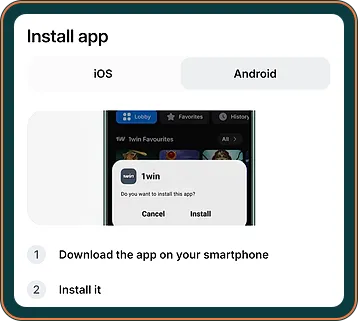
The “Install app” window on 14.10
On our check on 14.10 the same choice sat in an “Install app” window with two tabs. The iOS tab gave the short route: open the site in Safari, tap Share, then “Add to Home Screen”, then Add. No App Store step appeared. The Android tab points to the same app the menu item offers, straight from the site. Both tabs repeated the 200 Points reward, and neither stated a minimum Android or iOS version or how much space the app needs.
What standalone means on your screen
1win.ng publishes a web app manifest with the name “1win”, the display mode “standalone” and the start address “/”. In practice the icon opens the front page in a window of its own, with no Safari address bar or tabs. It looks like an app, and it shows the same live pages as the browser.
The Points reward for installing
“200 Points bonus for installing the app” is the only reward text on either menu item. The screen gives no naira value for the Points and does not say where they appear in your account, so treat them as a small extra and not a reason to install. They are separate from the welcome package, which is paid on deposits.
Using the 1win betting app and casino sections
Because we did not install the Android app, we describe what we saw on the mobile site, which is also what the iPhone web app opens. The bottom bar carries Menu, Home, Casino, Free money and Sports, on a dark theme, and each section we needed was one or two taps away.
Sports and casino on the same icon
The menu offers one app for both: no separate 1win casino app and betting app. Sports opens the sportsbook menu, Casino opens the lobby with search and an A–Z Providers tab. The 1win games section holds the operator’s own titles such as Lucky Jet, Mines 1win and Rocket Queen.
Mobile data is the thing to watch. Slots and quick games load once and play quietly, but a live dealer table streams video for every minute it is open, so keep live tables for Wi-Fi when your bundle is small.
Notifications and battery
We have no notes on push notifications or battery use: neither appeared in the steps or the manifest, and testing them would need an installed app. If the Android app asks for permission to send notifications, you can refuse and still use it; you can change the choice later in the phone’s settings.
1win app update: how new versions reach you
On iPhone there is nothing to update. The home-screen icon loads the live site each time, so you see the current version automatically.
For the Android app, the site’s three steps say nothing about updates, and we did not install it to find out. If an update request ever arrives from anywhere other than the “1win for Android” item, ignore it and repeat the steps from the menu instead.
Keeping the app safe on a shared phone
A phone that someone else also uses needs more care than a browser tab. Set a screen lock, do not let the phone remember your 1win password, and log out when you finish. Anyone who opens a logged-in app sees your balance and can reach the cashier.
To remove the iPhone version, press and hold its icon and delete it like any home-screen shortcut; on Android, uninstall it from the app settings. Your account stays on 1win.ng either way.
Where to go when the app will not let you in
If you have no account yet, the two-field sign-up from your phone comes first. If the password fails, the Phone and Email login tabs explained cover the password reset, and the chat route for app trouble explains what the support bot asks.
| Item | What 1win.ng showed | Status |
|---|---|---|
| “1win for Android” and its steps | QR code, three steps | Seen on site |
| “1win for iOS” and its steps | Five Safari steps | Seen on site |
| Standalone web app | Manifest published | Seen on site |
| “Install app” window, 14.10 | iOS and Android tabs, 200 Points | Seen on site |
| Value of the Points | No naira value given | Not checked |
| Android app screens, size, permissions | App not installed | Not checked |
| Update process on Android | Not described | Not checked |
Pros
- Both versions are offered from the site’s own menu with written steps
- The iPhone web app needs no store and always shows the live site
- One icon covers sports, casino and the cashier
Cons
- The QR code needs a second screen to scan
- No App Store listing for iPhone users
- Android screens, permissions and updates stayed untested
Our verdict on the 1win app
Our score from phone checks on 8, 13 & 14 Oct 2026 · how we score
The two routes are clear because 1win.ng writes its own steps, and the iPhone web app is a simple, low-risk home-screen icon. The Android side scores lower: the QR step is awkward with only one phone, and we could not check the installed app. This page’s score is the average of our Android and iPhone scores.
It suits iPhone users happy with a Safari icon, and Android users who have a second screen nearby and start from the typed address.
Who should skip it: anyone who wants a store listing, or who would rather keep the phone free of extra apps and use the browser.
Get the Android app from 1win.ng18+ · T&C Apply · operator named in the 1win.ng footer: BID Entertainment Limited
What changed on this page
- Page rewritten for 1winsapp.ng from our checks of 1win.ng on 8, 13 and 14 October; every 1win figure is marked by source.
- Updated with the third check: deposit limits per method, withdrawal times from the rules, KYC rules, lobby and sportsbook counts.
Found a mistake? Write to [email protected] and we will date the fix here.
FAQ
Is the 1win app free?
The steps on either item mention no price. The only money-related line is the Points reward for installing.
Can I get the iPhone version in Chrome?
The site's steps name Safari and its Share button. We did not try other browsers, so use Safari.
Does the app work without the internet?
We did not test offline use. The iPhone version loads live pages, so it needs a connection.
Will I lose my balance if I delete the app?
The balance belongs to your 1win account, not to the icon on the phone, so you can log in again in the browser. We did not test deleting the Android app.
Can two people use the app on one phone?
Only if each person has their own account and logs out fully after each session. We did not check the site's rules on shared devices.
Is there a separate 1win casino app?
Not in the menu we saw. One app item is offered for both Sports and Casino.
Learn more about 1win Withdrawal in our dedicated guide.