
What the Withdraw button opens
Test passport
- Checked
- 14 Oct 2026 (iPhone, Nigerian IP), after checks on 8 and 13 Oct
- Device
- Phones only: Android Chrome (8 and 13 Oct), iPhone Safari (13 and 14 Oct)
- What we did
- Pressed Withdraw and saw identity verification; read rules 6.11 and Terms section 4
- What we did not do
- No app installed; no deposit, withdrawal, document upload or bet made
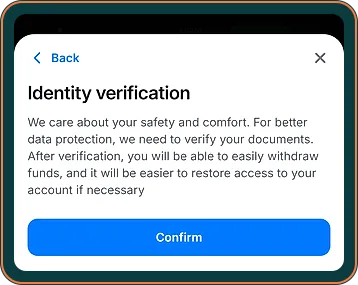
The first 1win withdrawal screen is not an amount box. On our Android check on 08.10.2026 and our iPhone check on 14.10, tapping Withdraw led straight to “Identity verification”, and nothing about payout methods or limits was visible before it.
| Parameter | Value |
|---|---|
| Screen after tapping Withdraw | “Identity verification” |
| Payout names, as the site states them | Opay, PalmPay, Paga, Paystack, Flutterwave, Visa (Nigerian cards) |
| ID accepted, per the live chat | Passport, residence permit or driver’s licence |
| Address proof (Terms 4.4.3) | Utility bill or bank statement, not older than 3 months |
| Minimum and maximum | Not shown before verification |
| Payout time (rules 6.11.4–6.11.5) | Up to ₦65,000: 1–60 minutes; above: up to 5 days |
| Cancelling | “X” next to a pending amount in “Details” (support, not in the rules) |
Verification first is the first of the 1win withdrawal rules a new player meets. It is also why there is no 1win minimum withdrawal we can quote: the figure sits behind the check. The deposit ceilings of ₦250,000 and ₦500,000 are deposit limits and say nothing about payouts.
What the Terms can ask you for
Section 4 of the Terms lets 1win ask at any time for an ID or passport, your NIN, proof of address and a statement for the payment method you use. You get 7 calendar days to send them; after that the balance can be held and the account closed. How long the review takes is not stated.
Your phone as a document scanner

The camera and the gallery do the work here. Before you start:
- Camera lens wiped, flash off for documents
- Bright daylight or a white lamp
- Free storage for several large photos
- Bank app able to export a statement
- Gallery hidden or locked on a shared phone
- Signal strong enough for uploads
Tap each switch when it is done. Nothing is saved or sent anywhere.
Photographing the ID
Any of the three IDs in the table will do, according to the chat. Lay the document on a dark, plain surface, hold the phone straight above it and keep all four edges in the frame. Against glare on a laminated licence, tilt the card away from the window. These are general tips, not 1win rules.
Getting the address proof onto the phone
A bank statement can usually be exported from the banking app as a PDF. Check its date against clause 4.4.3. A bill in a landlord’s name will not match your account, so a statement in your own name is simpler.
On a phone other people use, delete the document photos from the gallery and from “recently deleted” once the check is done.
How to withdraw on 1win, tap by tap
Steps 1 and 2 are what we saw. We uploaded no document, so the rest combines what support and the site state with general advice.
- Sign in, then tap Withdraw; the “Identity verification” page appears.
- Take the liveness selfie with the front camera; on 14.10 it was step 1 of 2.
- Watch out: on the next step add your ID and an address document recent enough for the Terms clause, with your name exactly as on the account.
- Give the staff time to review the files; do not upload them twice.
- Tap Withdraw a second time; the site states the form, methods and limits open now.
- Choose a payout name, type the amount and send. Your profile lists the request under “Details” with the status “pending”.
We did not check these steps in the Android app; the iPhone home-screen web app loads 1win.ng itself.
1win withdrawal time and the document check
On 07.10.2026 the live chat gave us a range of 24–72 hours for reviewing documents. That range is how long staff take to look at your papers, not a payout time. The payout time itself is written in rules 6.11.4–6.11.5.
| Item | What 1win.ng showed | Status |
|---|---|---|
| Payout up to ₦65,000 | 1–60 minutes | Stated by site |
| Payout above ₦65,000 | Up to 5 days | Stated by site |
| Your bank’s own processing | Up to 3 more business days | Stated by site |
| Review of your documents | 24–72 hours, said in the chat | Told by support |
| Fee on funds not wagered | Possible, rule 6.11.3 | Stated by site |
These are rules, not times we measured. The document check can take up to 72 hours by support’s figure, so verifying early keeps that wait away from your first payout.
How to withdraw money from 1win to the right place
Planning how to withdraw money from 1win begins at the deposit: pay in with a method that also appears on the payout side. Opay, PalmPay and Paga are named on both sides; for cards, only Visa (Nigerian cards) is named for payouts. How the nine deposit entries line up with the six payout names is set out on our side-by-side list of cashier names.
If you are working out how to withdraw from 1win in Nigeria with a bonus still running, there is one more step: the bonus card limits how much bonus money can be taken out. Read the cash-out cap on the welcome card before you request a payout so the amount you type is one you can actually receive.
Cancelling a request you sent by mistake
A request you regret can be cancelled, support told us on 07.10: in your profile go to “Details” and tap the “X” beside the amount while the status reads “pending”. This is support’s word, not a rule: the rules do not describe cancelling, and rule 6.6 says the client may not cancel transactions. Treat a request that has left “pending” as final.
1win withdrawal problem: stuck, rejected or pending
A 1win withdrawal problem tends to fall into one of three cases.
Stuck at the document check
Past the range support gave, check that the photos are sharp, then write in the live chat under “Personal account | Verification”.
Document rejected
Take a new photo rather than resending the same file, or switch to a bank statement.
Request sent, still pending
Check the payout details, then write under “Withdrawal” with the date, amount and payout name. Never send a password, OTP or card PIN. Our wait for a human in that chat is recorded on the page about how 1win’s chat bot and agents answered us.
Pros
- Payout times written in the rules
- Three wallet names on both deposit and payout side
- Documents can be photographed with a phone camera
- A pending request can be cancelled from the profile
Cons
- No minimum or maximum before verification
- Document rules are told in the chat and the Terms, not on the screen
- Mastercard and Verve not named for payouts
- Android app route not checked
Verdict on the mobile cashier: getting paid
Our score from phone checks on 8, 13 & 14 Oct 2026 · how we score
The withdrawal route fits a phone well: documents go in through the camera, and three common wallets are on the payout side. The score matches our deposit page: payout times now sit in the rules, but limits stay behind the check, and we sent no payout of our own.
It suits a phone user with a recent statement in the banking app and a wallet such as Opay, PalmPay or Paga for the money to land in.
Who should skip it: a player who must see payout limits in writing before paying in.
Open 1win.ng18+ · T&C Apply · operator named in the 1win.ng footer: BID Entertainment Limited
What changed on this page
- Page rewritten for 1winsapp.ng from our checks of 1win.ng on 8, 13 and 14 October; every 1win figure is marked by source.
- Updated with the third check: deposit limits per method, withdrawal times from the rules, KYC rules, lobby and sportsbook counts.
Found a mistake? Write to [email protected] and we will date the fix here.
FAQ
How long does the identity check take?
Support told us 24–72 hours on 07.10. The Terms give no duration; they give you 7 calendar days to send the documents.
Can I upload a screenshot of my bank statement?
The site does not say which file types it accepts. A clear screenshot or PDF export from your banking app is worth trying first; if it is rejected, ask support for the format.
Do I have to verify before every withdrawal?
Not as a fixed step, but section 4 of the Terms allows a document request at any time, so keep the files at hand.
Does 1win charge a withdrawal fee?
Rule 6.11.3 says a fee may apply when you withdraw funds that were not wagered. No other fee was shown before verification; your wallet or bank may still charge.
Can I withdraw to a wallet that is not in my name?
1win.ng does not say. A wallet in your own name matches your documents and avoids a second round of questions.